You said you wanted a website that didn't look like a Wix template. This page is a working catalogue of how photographs can live on websites — laid out so you can see how each option would actually feel against the visual register your site is being built in. Skim. Pick favourites. Argue with the recommendations.
What this is, and isn't.
This is a catalogue, not a finished decision. Taylor put it together in your absence — the picks below are recommendations, not ratifications. Bring this to the meeting; we'll walk through what fits, what doesn't, and what we should swap. Anything you'd rather see done differently is the right answer.
The first seven items are rendered as working demonstrations in the visual register Direction A is being built in, using two of your projects (Masquerade and the LEGO/Wicked Premiere) as actual content. The rest of the landscape is surveyed below the seven, with small visual sketches so you can see what each pattern looks like at a glance.
Before the swatches — a quick note on photos.
Photos that make these patterns work.
Most of what's below depends on having the right pictures on hand. A short read on what's required vs nice-to-have so you can plan the photo side of the project alongside the design side.
Must-haves
Three frames per project — one establishing wide shot, one close-up detail, one finished/worn shot. Without all three, the mini-comic portfolio collapses to a single-image card.
Decent resolution — zoom-tolerant for lightbox & art-book treatments. Phone shots work fine when the lighting was good.
One strong hero photograph — something that earns the front door of the site.
Nice-to-haves
A sketch-or-early-stage paired with finished — unlocks the before/after slider. Could be early design sketch, in-progress mockup, or build-shop shot vs finished.
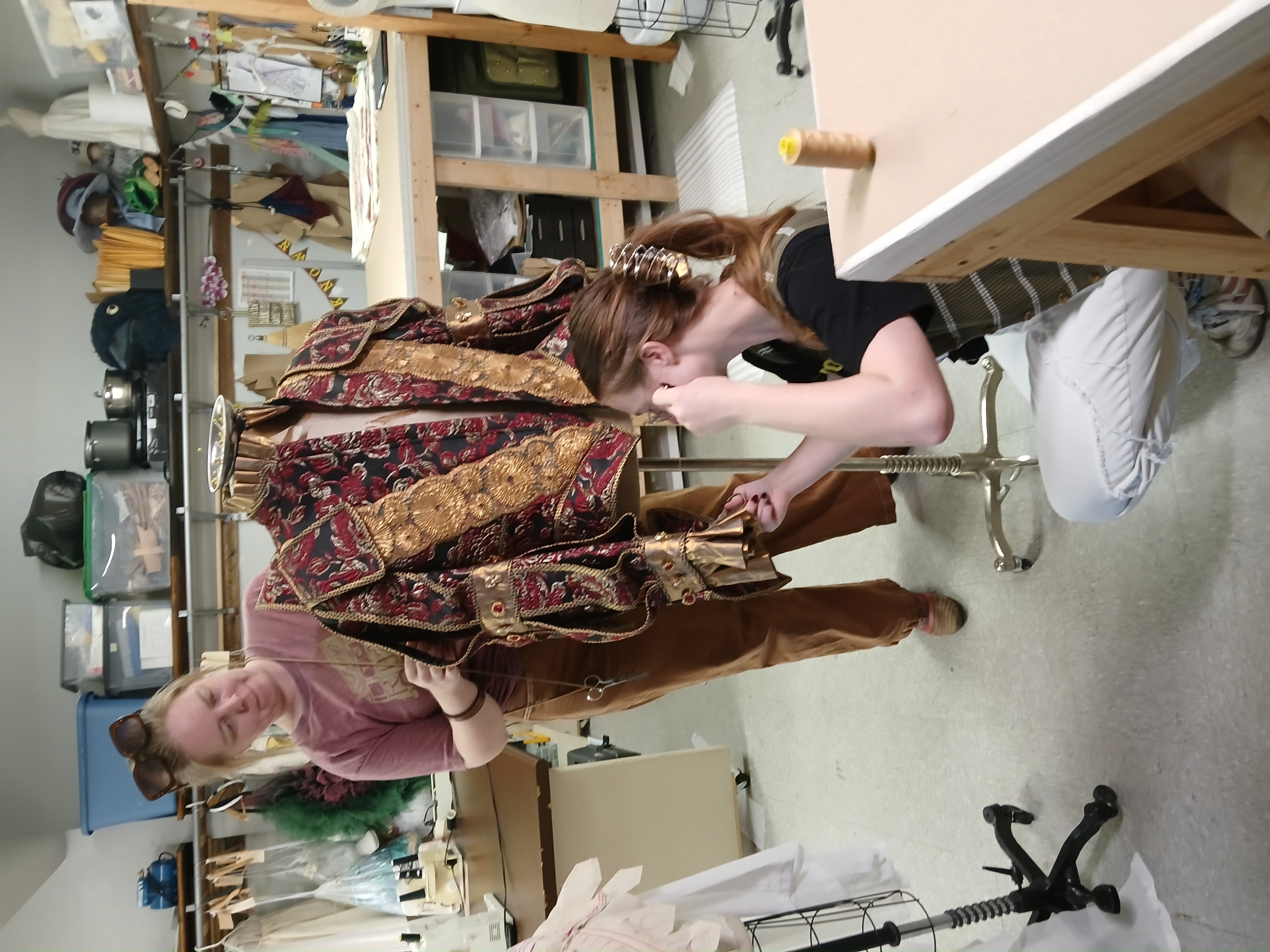
Behind-the-scenes shop moments — two of the team mid-build, hands cutting, partial costumes on dressforms. These will go black-and-white per the design slate.
A signature image with overlay-able space — composition that leaves a corner clear for a speech-balloon caption.
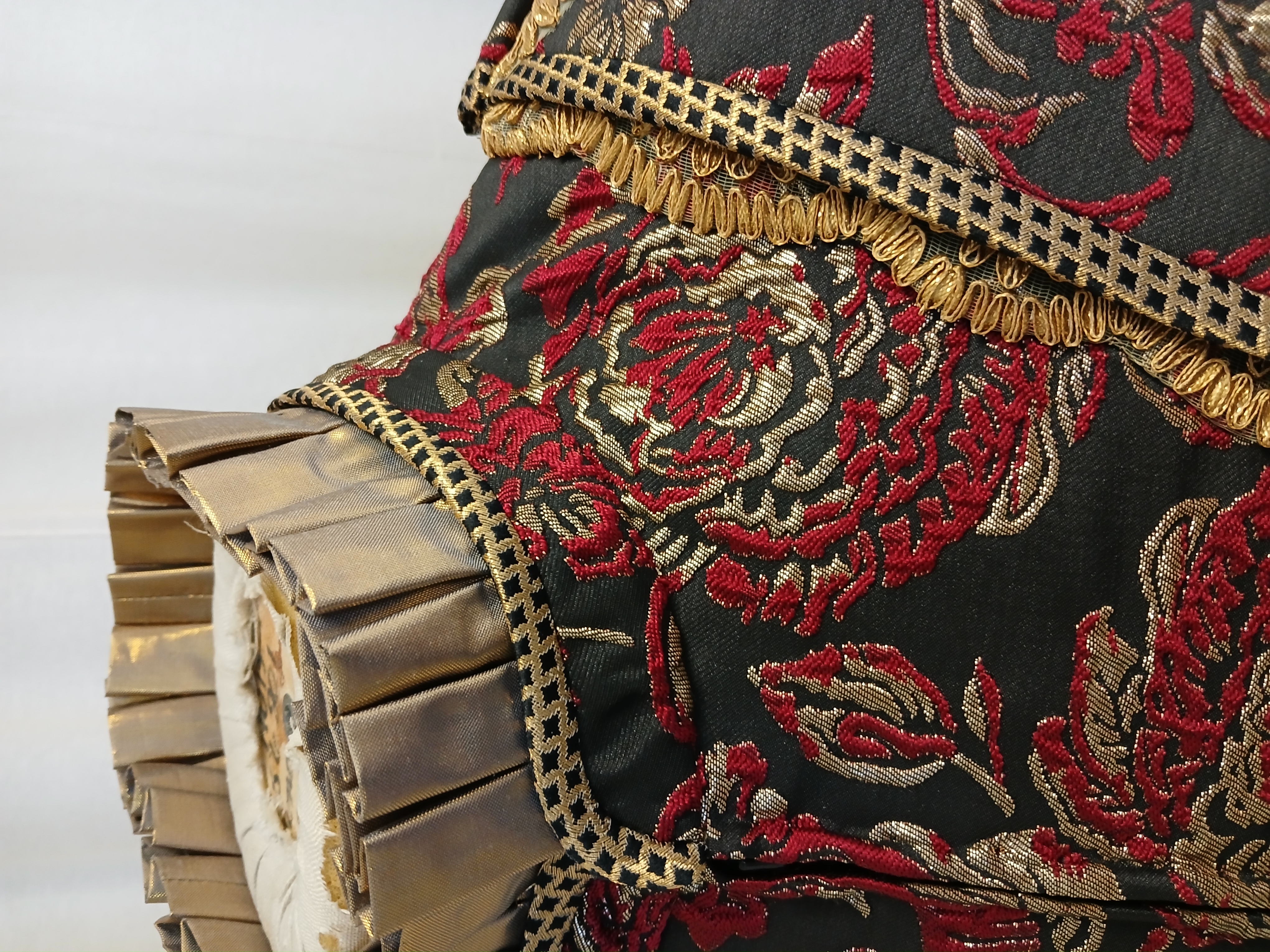
Detail close-ups of textile / craft work — the patient eye rewards: stitching, trim, hand-finished edges.
Practical notes
Model releases for any client/performer wearing a finished costume in identifiable portfolio use.
Consistent lighting across photos in one project's three-frame story helps the sequence read as one piece.
Aspect ratio mix is fine for the masonry layout (variety is the feature). Uniform grid wants same-ratio crops.
File-name and brief description per photo — a few words per image makes everything else faster.
Research backing — sources behind these recommendations
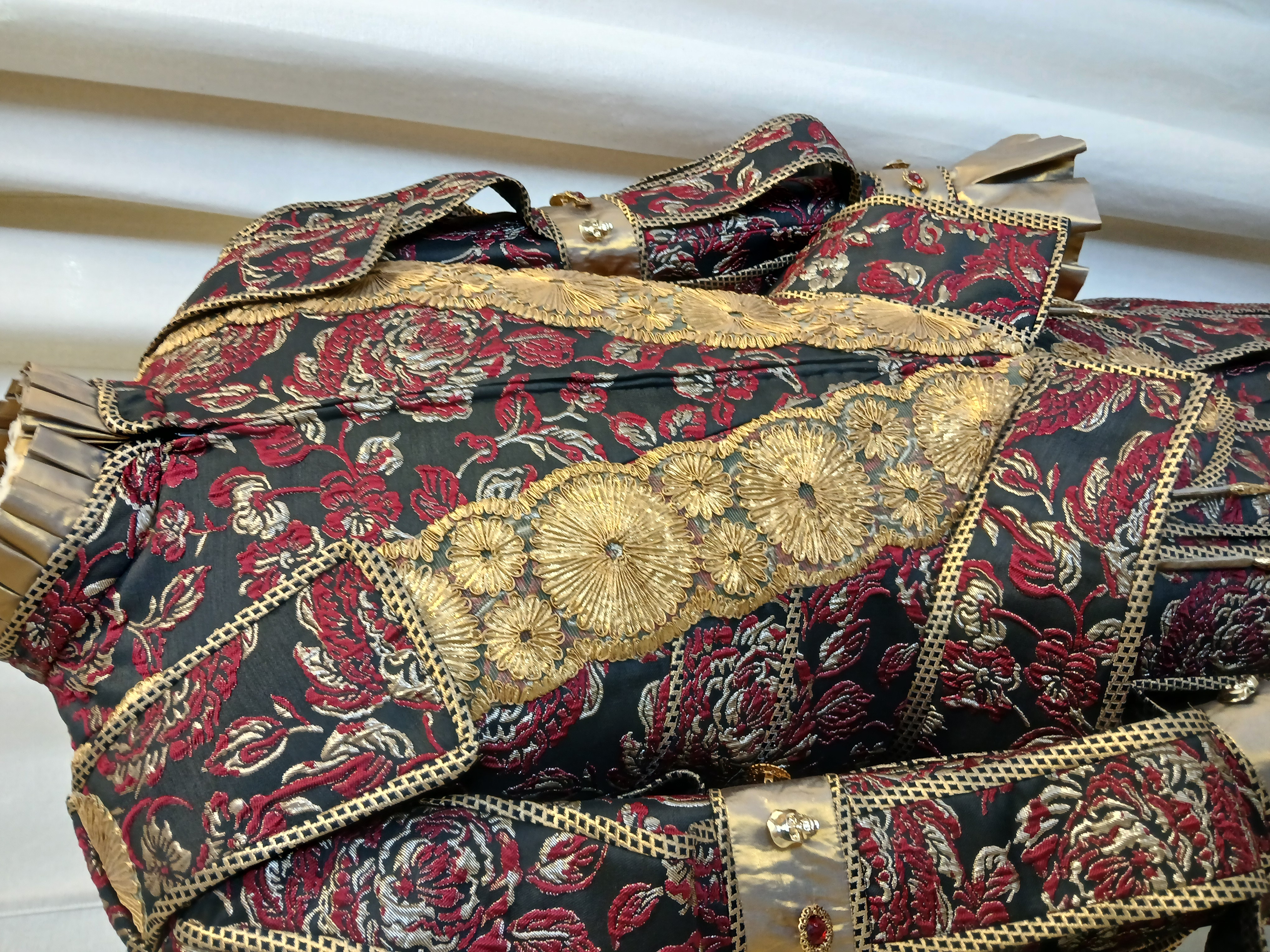
Each project laid out as three panels — establishing shot, close-up, finished piece. The slate calls it "like a page from an art book" and that line stuck with us. It pairs with the comic-book grammar of the rest of the site without becoming gimmicky, and it gives every project a small narrative arc instead of a single static photo.
Project · Masquerade — Costume A
PANEL 1 · ESTABLISHING
PANEL 2 · CLOSE-UP
PANEL 3 · FINISHED
Why this fits Direction A. Each project becomes three frames of a sequence — exactly the comic-book grammar the rest of the site is built in. The panels read as a beat: where it started (the build), what we paid attention to (the detail), what shipped (the form). The build-shot goes black-and-white per the design slate's "behind-the-scenes" rule; the finished and detail shots stay in colour. Same discipline applies to any future project: three pictures per entry, lifecycle-shaped.
Taylor (in your absence) chose Masquerade as the headline demonstration project — full lifecycle on display. Confirm or revise.
Above the fold, on the home page —
A carousel of three comic-frame stills.
Direction A's hero spec calls for the leather-jacket-with-tiger above, and below it: "a carousel of three recent projects as comic-frame stills." Manual-control only — auto-rotation is a known anti-pattern (it disrespects readers). Click the arrows or swipe.
Masquerade · Costume A
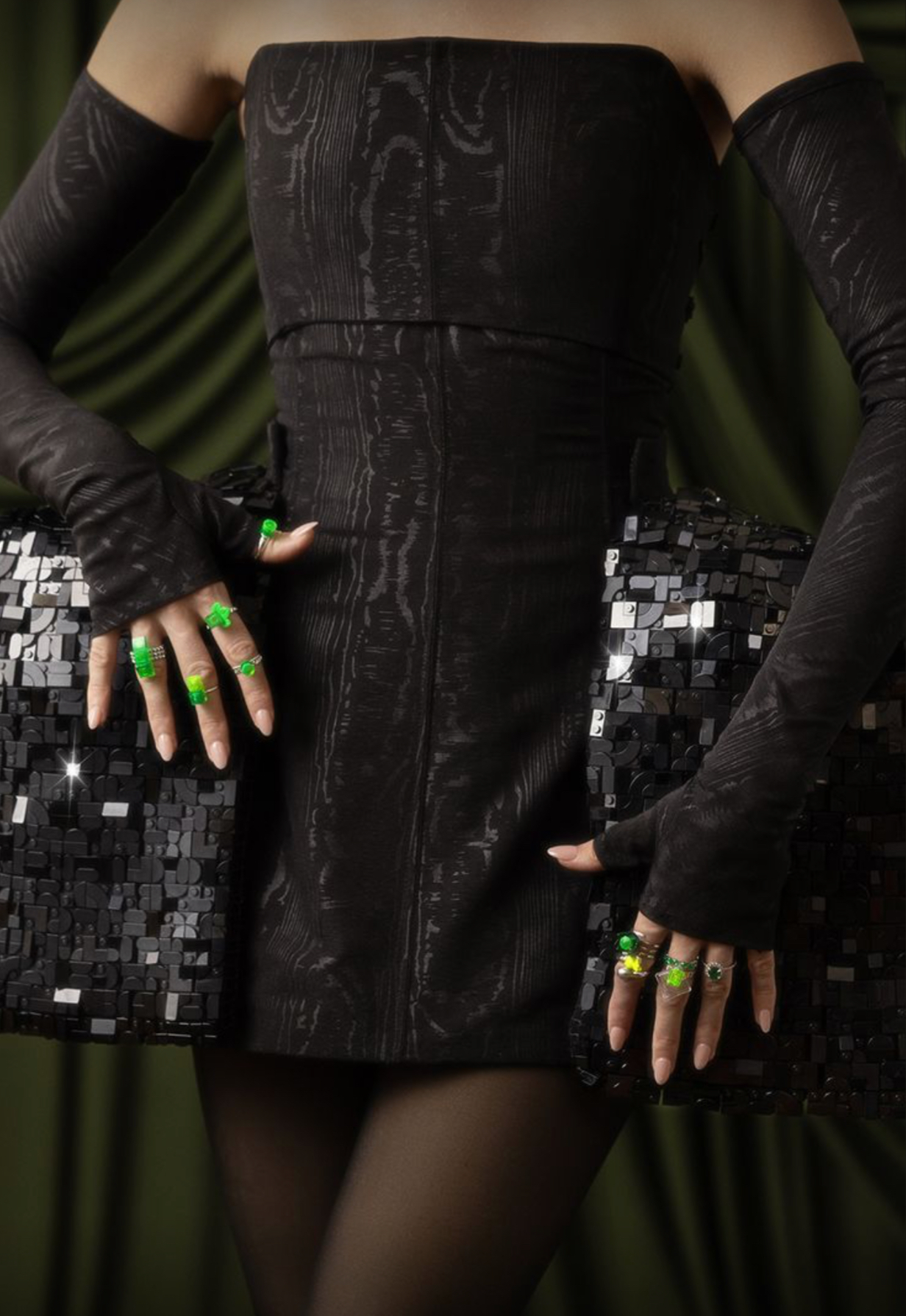
LEGO · Wicked Premiere
Masquerade · Build
Why this fits Direction A. Three stills in sequence read as a triptych — a recurring comic motif. Mixing finished-piece shots with a behind-the-scenes build frame (in black-and-white) reads as range without losing coherence. Once you have more projects organized with their own three-frame stories, this carousel can refresh quarterly to feature whichever three are most current.
Taylor (in your absence) chose Masquerade and LEGO/Wicked Premiere as the two project options for the catalogue. Once you have additional projects organized with their photo sets, we can expand the carousel rotation.
For the process page, the comic stays.
A four-panel process strip.
From the slate: "The process page is actually laid out like a four-panel strip. Inquiry → fitting → build → final. Short narration bars walk the reader through it." What the panels say below is a draft Taylor wrote in your absence — it's a starting point, not a finish line.
PANEL 01
Inquiry
"You've got an idea. Tell us about it." First contact, scope conversation, what we'd do together.
PANEL 02
Fitting
"Measurements. Photos. References. Privacy lives here." Your privacy paragraph about what we keep and what we delete sits inside this panel.
PANEL 03
Build
"The work happens. We'll show you as it goes." Updates as the build progresses — the part most clients have never seen before.
PANEL 04
Final
"It's yours. Stage-ready, finish-ready, you-ready." Last fit, hand-off, lights up.
Why this fits Direction A. The process page is exactly where the comic grammar earns its keep — a process is a sequence by definition, and panels are how comics show sequence. The narration bars give us a place for the voice (theatre-kid, professional, a little funny) without crowding the body copy.
Taylor (in your absence) wrote the four narration lines above. Voice is theatre-kid-with-attitude per Direction A grammar. Rewrite, soften, or replace at meeting.
For moments that want to say something —
The caption-balloon.
A speech-balloon overlaid on a photograph. Useful where a line of voice belongs on the image rather than below it. The slate's "speech-balloon moments where they fit the content" — used sparingly, used well.
"Like a page from an art book."
Why this fits Direction A. The whole site speaks comic-book; balloons are how comics put words on pictures. A balloon over a hero, a balloon over a single portfolio image — read as a quick line of voice without leaving the visual register. The constraint: brief lines only; long captions belong below the image.
As page-section openers —
The narration bar.
A bar of voice at the top of a long page-section, like a comic narrator stepping in for one frame. The slate names this for long pages: "narration bars at the top of long pages." Each section header on this page is one of these.
Meanwhile, in the workshop — the build is underway.
Cut to · the dressing room.
Hours later — the final fitting.
Why this fits Direction A. Pages of any length need rhythm. The narration bar is a beat-pause that tells the reader where they are, and it carries the comic register into the body of the site without needing illustrations everywhere. They're cheap to author and very legible. (Indeed — every section header on this page is one.)
For showing the journey of a piece —
Before-and-after.
Drag the handle. Reveals one image as another. Useful for build-vs-finished, sketch-vs-final, alteration-vs-original — any pair where the comparison is the story. Keyboard-accessible: focus the handle, use arrow keys.
Why this fits Direction A. Costume work has a lifecycle — design → drafting → build → finished. The slider is the most direct way to show that lifecycle on a single image. Pairing the build-shop shot (in black-and-white per slate) with the finished dressform turns one image into two beats of one story. Same paneled border + ink shadow as the rest of the site.
As a style discipline running through everything —
Art-book hierarchy.
Less an option, more a discipline: image dominates, text is brief, generous breath around both. The slate's "like a page from an art book" applied to portfolio + gallery treatments. Below is the LEGO/Wicked Premiere hero given the art-book treatment instead of a standard portfolio-page treatment.
LEGO, Wicked Premiere.Black panier dress photographed on the wearer at the Wicked premiere. Built in-shop on dressform; fit-checked for stage and step-and-repeat. Photographed by the wearer's team.
Why this fits Direction A. Direction A's "graphic novel in the serious sense" register pairs well with art-book hierarchy. The image gets to breathe; the caption is reverent and brief. This isn't a separate component — it's a way to lay out any single-image moment so it reads as authored, not as decorative filler.
Twenty-one more options, with little previews.
These are the broader landscape — common, popular, or best-practice ways of presenting photographs on websites. Each has a small visual sketch so you can see the pattern at a glance, plus a Direction-A pairing pill. If any catch your eye, we can promote it to a full demo before next session.
Full-bleed hero photo
HEADLINE GOES HERE
The big front-door image. Direction A renders this as the jacket-with-tiger.
Already the spec
Work-in-progress hero
Direction-B alternative: a stitch, a dressing-room moment.
Body text wraps around an image inserted inline — the workhorse pattern across the whole site.
Image inside body text. Used everywhere body content needs imagery.
Baseline
Diptych / split-screen
Two images side-by-side. Reads naturally as a 2-panel comic frame.
Compatible
Image card layout
Image + short caption + metadata, repeated as tiles. Panel borders make it comic-coherent.
Compatible
Mosaic / masonry
Pinterest-style. Tiles of varying heights pack together. Great with 9+ images of varied aspect ratios.
Compatible
Uniform grid
Equal-size tiles. Orderly rhythm. Works with comic-panel borders applied.
Compatible
Filterable gallery
AllStageFilmCustom
Tag-chip filters above the grid. Useful when portfolios get larger and varied.
Compatible
Lightbox / modal zoom
Click thumbnail → zoom into overlay. Reads as panel-zoom moment.
Compatible
Hover-reveal overlay
CAPTION REVEALED ON HOVER
Caption appears on hover. Carries the caption-balloon (Marquee 4) as a sub-pattern.
Strong fit
Manual carousel (general)
◄ SLIDE 1 OF 5 ►
The general manual-carousel pattern. Marquee 2 above is its strongest specialization.
Conditional
Auto-rotating carousel
DON'T USE — anti-pattern
Auto-advancing slideshow. Anti-pattern. Frustrates users; accessibility-fragile. The internet has a website devoted to telling you not to use these.
Avoid
Marquee strip
Continuous-scroll horizontal strip — the kind that never stops. Trendy. Respects reduced-motion preference.
Conditional
Horizontal scrolling gallery
Manual scroll with snap-points. CSS-only, no JavaScript. Natural alt to the carousel.
Strong fit
Parallax scroll
Background moves slower than foreground. Cinematic. Direction A primary is panel-static, not scroll-cinematic.
Secondary
Ken Burns effect
Slow zoom-and-pan on a photo. Cinematic, low-effort. Conflicts with Direction A's static jacket-with-tiger hero.
Avoid for A
Stacked storytelling
Narrative beat one — image speaks first.
Beat two — text catches up.
Alternating image-text blocks — vertical analog of the panel rhythm. Excellent for case studies.
Strong fit
Documentary-photo timeline
Direction-C alternative process page treatment. Each step is a real image of real work.
Not primary for A
Magazine-style case study
Long captions, photography-led, occasional illustrated interludes. Editorial register — typography-led; harder to render meaningfully in a small preview. Direction-B/C-leaning.
Not primary for A
Theater-program portfolio
Direction-D alternative: Acts/Scenes, Dramatis Personae, theatrical metadata. Typography-led — preview-resistant. Best demonstrated as a full mockup if you want to see it.
Not primary for A
For the meeting.
Bring opinions. Strong feelings about the headline mini-comic, strong feelings about the four-panel process strip, strong feelings about which projects belong in the carousel — these are all the kinds of choices that need your taste, not Taylor's guess.
Anything you don't see represented that you wanted to? That's important. Anything in the tail you'd want promoted to a full demo? We can do that quickly.
One small recommendation, separate from the design choices: spending a light hour with each of your projects organizing photo sets and brief descriptions has high leverage — it unlocks every pattern above. Details are in the questions list we'll bring to the meeting.